Best Mac Cleaner 2026: AI-Powered Dusty vs CleanMyMac, DaisyDisk, BuhoCleaner & More (Real-World Test)
The Dusty Team
Mac storage guides
menu_book Table of Contents
help_outline Why Most Mac Cleaners Are Overpriced in 2026 (And What Actually Works)
If your Mac is constantly nagging you with "Disk Almost Full" notifications, you are not alone. In 2026, modern workflows — heavy developer toolchains, multi-gigabyte WhatsApp Desktop audio caches, and mysterious "System Data" — can quietly swallow 50 GB to 150 GB+ on a standard 512 GB MacBook.
The problem? Most "Best Mac Cleaner" comparison lists continue pushing the same legacy subscription software charging $39.95 to $49.95 per year for basic cache wiping. Meanwhile, free utilities either scare you with unformatted UNIX file paths or only handle basic app uninstallation without cleaning deep project bloat.
lightbulb The 2026 Reality:
For 95% of Mac users today, the winning solution is an AI-powered, perpetual lifetime cleaner under $10 that explains exactly what it is deleting before touching the disk, keeps 100% reversible Trash safety, and tackles real developer dependencies. That is precisely why Dusty has quickly become the top-recommended choice across Mac communities.
science How We Tested in Our Lab
We benchmarked the leading Mac disk utilities on an Apple Silicon MacBook Pro (M2, 512 GB SSD) running the latest macOS version. The testing drive contained real-world accumulated clutter:
Each cleaner was evaluated on Cleaning Depth, Safety & Reversibility, AI File Reasoning, Performance/System Overhead, and Pricing Value.
award_star Quick Verdict: Best Mac Cleaner by Use Case (2026)
Dusty
Gemini AI file explanations, deep developer bloat purging, WhatsApp surgical media cleanup, 1-Click App Uninstaller, and 100% reversible Trash safety. $7.99 Launch Special ($9.99 Lifetime).
CleanMyMac
Comprehensive maintenance routines, malware scanning, and polished UI. Expensive at $39.95/year or $119.95 lifetime; generic cache cleaning with no developer stack awareness.
DaisyDisk
Iconic interactive sunburst disk map for $9.99 one-time. Purely a visual manual inspector with no AI explanations, no developer tools, and no uninstaller.
Sensei
Excellent CPU/GPU/battery telemetry, thermal stats, and basic junk cleaning. Priced at $29/year or $59 one-time; overkill if your primary goal is disk recovery.
table_chart Master Comparison: Dusty vs CleanMyMac vs DaisyDisk vs BuhoCleaner vs Sensei
| Feature | Dusty (AI) | CleanMyMac | DaisyDisk | BuhoCleaner | Sensei |
|---|---|---|---|---|---|
| 1 Mac Pricing | $7.99 Launch ($9.99 Life) | $39.95/yr or $119.95 | $9.99 flat | $19.99–$25.99 | $29/yr or $59 |
| Pricing Model | Pay Once, Own Forever | Recurring / Lifetime | One-Time | One-Time | Recurring / Lifetime |
| AI File Explanations | ✅ Gemini 1.5 Flash | ❌ Rules-Based | ❌ No AI | ❌ No AI | ❌ No AI |
| Developer Stack Cleaning | ✅ node_modules, Xcode, Docker | ⚠️ Basic Caches Only | ❌ Manual Selection | ⚠️ Basic Xcode Only | ⚠️ Some Dev Caches |
| WhatsApp Media Purge | ✅ Purges Media, Locks SQLite | ❌ Generic Search | ❌ Manual Search | ❌ Not Supported | ❌ Not Supported |
| 1-Click App Uninstaller | ✅ Deep ~/Library Wiper | ✅ Built-in | ❌ No Uninstaller | ✅ Built-in | ✅ Built-in |
| Safety Architecture | ✅ 100% Trash-First | ⚠️ Mixed Deletion | ❌ Direct Delete Risk | ✅ Trash-First | ✅ Trash-First |
| Background Daemons | ✅ Zero (Runs on-demand) | ❌ Heavy Background Helper | ✅ Zero | ✅ Zero | ⚠️ Optional Helper |
1. Dusty: AI-Powered Storage Cleaner for Modern Macs
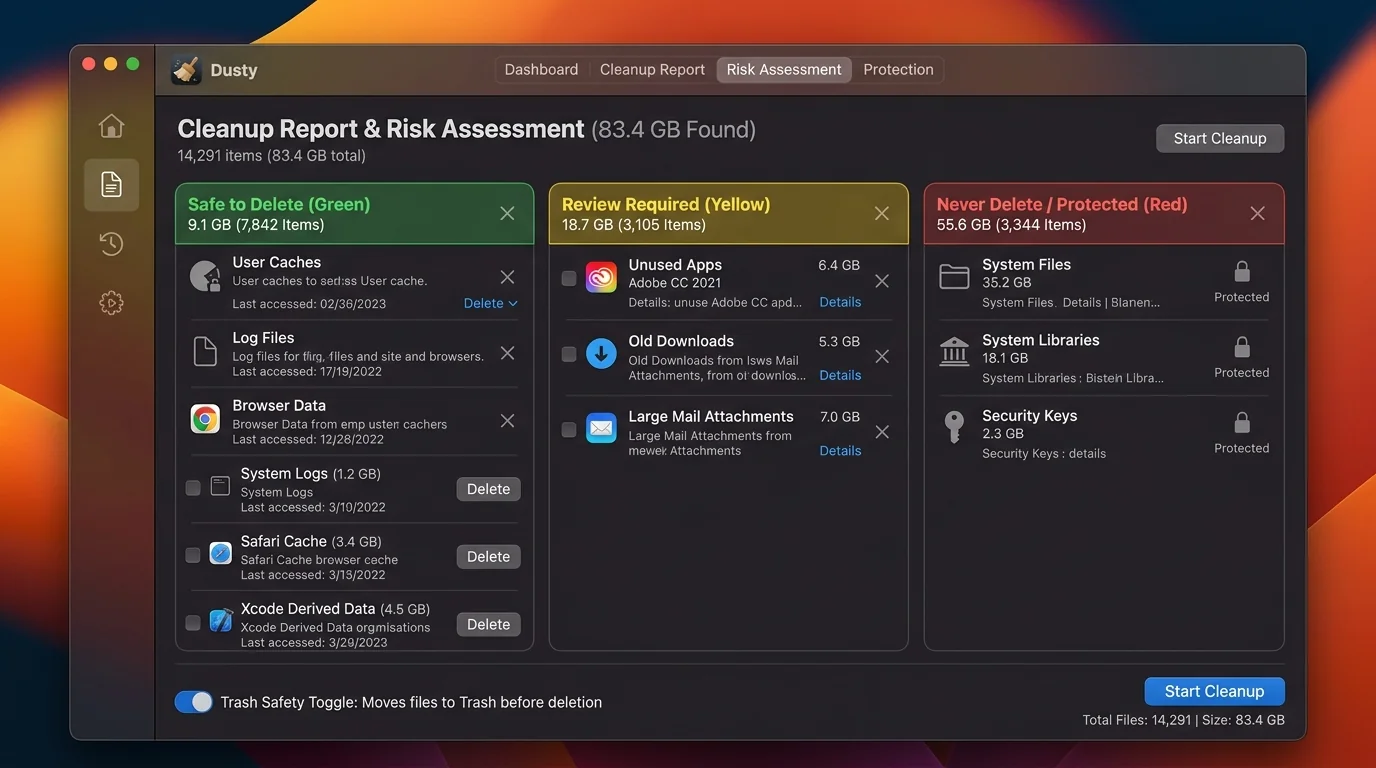
Dusty is the first Mac utility to place AI contextual reasoning at the heart of disk management. Traditional cleaners merely dump cryptic paths like ~/Library/Developer/Xcode/DerivedData (18.4 GB) onto your screen and ask you to blindly guess whether deleting it will break your system.
Dusty analyzes file metadata locally and provides plain-English explanations powered by Google Gemini:
thumb_up Why Dusty Wins
- AI explanations remove deletion anxiety completely
- Deep surgical awareness of developer & chat caches
- 1-Click App Uninstaller wipes hidden support junk
- 100% reversible Trash-first deletion architecture
- Unbeatable price: $7.99 Launch Special / $9.99 Baseline
- Zero background daemons or resident memory bloat
info Considerations
- Laser-focused on storage; does not include malware scanning
- Requires internet connection for cloud AI summaries (local scanning runs 100% offline)
Community-Approved CleanMyMac Alternative
See how Mac power users and developers rate Dusty on AlternativeTo.
cleaning_services 2. CleanMyMac X: The Legacy All-in-One Suite
CleanMyMac (by MacPaw) has been a staple in the Mac ecosystem for over a decade. It features high design polish, smooth animations, and bundled tools including privacy cleaners, malware detection, and maintenance scripts.
Strengths
- Comprehensive suite covering malware, shredder, and performance scripts
- High visual polish and guided maintenance wizard
- Widely recognized brand with years of market presence
Weaknesses
- Heavy subscription cost: $39.95/year or $119.95 one-time for 1 Mac
- Persistent background helper daemon that consumes RAM
- No specialized developer stack cleaning (
node_modules, Docker, Gradle) - No AI explanation layer; relies on generic category checklists
donut_large 3. DaisyDisk: The Classic Visual Treemap
At $9.99 one-time, DaisyDisk is the gold standard for visual disk exploration. Its interactive sunburst diagram lets you click into concentric rings representing folders to instantly spot large video files, virtual machines, and disk images.
Strengths
- Fast, responsive, and gorgeous sunburst visualizer
- Fair one-time pricing with no subscription requirement
- Extremely lightweight with zero background daemons
Weaknesses
- Purely a visual inspector — does not automate safe cleaning
- No AI insights to explain whether complex caches are safe to touch
- No developer stack awareness, WhatsApp cleaner, or app uninstaller
- Direct deletion mode can permanently erase data if misused
devices 4. BuhoCleaner & Sensei: Mid-Range & Power User Alternatives
BuhoCleaner ($19.99–$25.99) acts as a streamlined, subscription-free alternative to CleanMyMac. It provides solid general cleaning and uninstallation, though it lacks AI intelligence and modern developer stack awareness.
Sensei ($29/year or $59 one-time) is built for Mac enthusiasts who want deep hardware telemetry (temperature sensors, fan speeds, SSD SMART health, GPU stats) alongside basic junk cleaning. If you only care about reclaiming storage, its advanced monitoring suite is largely overkill.
payments Pricing Showdown: How Much Are You Really Paying Over 3 Years?
| Cleaner App | 1 Mac Cost | 3 Macs Cost | Subscription? | 3-Year Total (1 Mac) |
|---|---|---|---|---|
| Dusty (AI) | $7.99 Launch ($9.99 Life) | $14.99 Lifetime | No (Pay Once) | $7.99 – $9.99 |
| CleanMyMac | $39.95 / yr | $79.95 / yr | Yes ($39.95/yr) | $119.85 |
| DaisyDisk | $9.99 | $9.99 | No (Pay Once) | $9.99 |
| BuhoCleaner | $19.99 – $25.99 | $29.99 | No (Pay Once) | $19.99 – $25.99 |
| Sensei | $29.00 / yr | Custom | Yes ($29/yr) | $87.00 |
Key Takeaway: For a utility you only need to run once a month or quarter, paying $119+ over 3 years for CleanMyMac is impossible to justify when an intelligent AI cleaner like Dusty delivers superior developer and WhatsApp recovery for under $10 once.
quiz Frequently Asked Questions
Are Mac cleaners actually safe in 2026?
Reputable tools like Dusty, CleanMyMac, DaisyDisk, and BuhoCleaner are safe when used properly. The risk comes from using unverified terminal scripts or aggressive tools that permanently delete files immediately. Cleaners that enforce 100% reversible Trash-first deletion and explain files before deletion (like Dusty) are the safest for day-to-day use.
Do I need a Mac cleaner at all?
macOS includes built-in storage management, but it only displays broad categories. It cannot safely distinguish between active vs abandoned node_modules, Xcode simulator runtimes, WhatsApp media caches, or orphaned ~/Library application support files. A dedicated cleaner typically recovers 20 GB to 100 GB+ of hidden space.
Is a recurring subscription worth it for a cleaner?
For most users, no. Storage cleaning is not a daily habit. Users who sign up for monthly or annual subscriptions often face subscription fatigue. A perpetual lifetime license (like Dusty's $7.99 launch special or $9.99 standard) eliminates recurring fees while providing all future updates.
Will AI cleaners like Dusty delete important files by mistake?
No. Dusty is built conservatively. It uses Google Gemini 1.5 Flash to analyze non-sensitive file paths and metadata, explaining what generated the files before you take action. Everything is sent to the macOS Trash first, so you can restore anything with one click if needed.
The Final Verdict for 2026
If you want AI-powered explanations so you understand what you are deleting, deep developer & WhatsApp media cleaning, a built-in 1-Click App Uninstaller, and a perpetual lifetime license under $10 with zero subscriptions — Dusty is the undisputed #1 best value Mac cleaner in 2026.
Reclaim Up to 100 GB+ Safely with Dusty
Download Dusty for free to run a full diagnostic scan with AI explanations, or unlock lifetime access for just $7.99.