WhatsApp Desktop Hoarding Storage: Where Media Hides
The Dusty Team
Mac storage guides
format_list_bulleted Quick Navigation (Table of Contents)
WhatsApp Desktop for Mac is one of the biggest silent storage thieves on macOS Sonoma and Sequoia. Unlike the web version, WhatsApp Desktop downloads and caches every high-resolution video, voice note, PDF attachment, and photo sent across your group chats, permanently storing them in hidden Library directories. Here is how to safely purge gigabytes of cached media without losing your chat history.
folder_special 1. Where WhatsApp Stores Media on Mac
Depending on whether you installed WhatsApp from the Mac App Store or direct DMG download, your files live inside macOS Group Containers:
Inside this folder, you will find nested subdirectories containing years of forwarded video files, audio voice notes (.opus), and image thumbnails consuming between 10GB and 40GB.
warning 2. Critical Warning: Never Delete ChatStorage.sqlite
Inside group.net.whatsapp.WhatsApp.shared sits a critical database file called ChatStorage.sqlite.
- ✖ UNSAFE: ChatStorage.sqlite contains your entire unencrypted text message history, group affiliations, and message timestamps. Deleting this file will permanently wipe your chat history from your Mac.
- ✔ SAFE: Files inside the Media/ folder can be safely deleted. When deleted, text messages remain intact, and missing media displays a re-download cloud icon inside the chat.
Don't risk manual errors — Clean WhatsApp media automatically
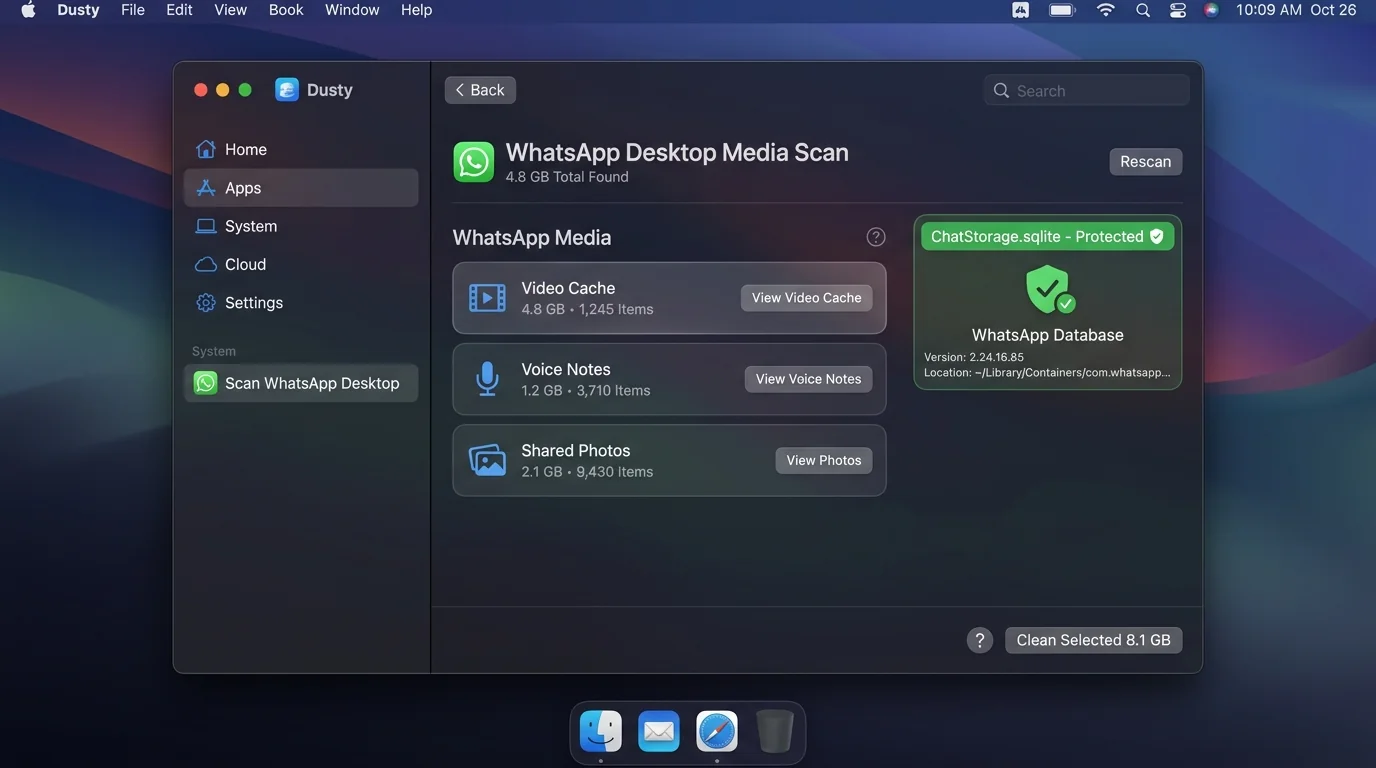
Dusty isolates heavy WhatsApp audio notes and video caches while safeguarding ChatStorage.sqlite. Reclaim 10 GB – 30 GB+ in 1 reversible click.
brew install theappcenter/tap/dusty
checklist 3. Step-by-Step Manual Media Purge Guide
- Quit WhatsApp Desktop completely (Cmd + Q).
- Open Finder and press Cmd + Shift + G (Go to Folder).
- Paste:
~/Library/Group Containers/group.net.whatsapp.WhatsApp.shared/Media - Sort by file size to identify large
.mp4and.movvideo files. - Select the heavy media files and move them to Trash.
- Empty the macOS Trash to permanently reclaim your disk space.
shield 4. Why Generic Mac Cleaners Corrupt WhatsApp
Most generic cleaners (like CCleaner or legacy utilities) treat application containers as all-or-nothing directories. When instructed to "clean WhatsApp caches", they wipe the entire container, corrupting the SQLite pointer map and forcing you to re-link your phone and lose desktop message archives.
auto_awesome 5. Surgical Extraction with Dusty AI
Dusty’s WhatsApp Smart Clean module was built specifically to solve this problem. It performs a surgical scan that extracts bulky media from the Media/ folder while hardcoding protection for ChatStorage.sqlite, freeing 10GB–30GB in one safe, reversible click.
Need More Physical Storage? Top Mac External SSDs
Cleaned internal caches but still need archive space? These are the fastest USB-C & Thunderbolt drives for Apple Silicon:
Up to 1,050 MB/s transfer speed, rugged drop-proof rubber casing, USB-C native.
IP65 water & dust resistance, compact carabiner loop, ideal for photographers & travelers.
Ultra-compact aluminum build, up to 2,100 MB/s, plug-and-play for 4K video editing.
Reclaim Storage Instantly with Dusty
Stop hunting through hidden Library folders. Let Dusty's AI safely analyze and clean your Mac storage in minutes.